MCP agent access
Bitsmith exposes an MCP endpoint so an AI agent (such as Claude or another MCP client) can operate your server: create and control virtual machines and LXC containers, manage apps and folders, configure the reverse proxy, and read storage and health. MCP (Model Context Protocol) is the standard those tools use to call into a system like Bitsmith.
Access is gated by tokens you create. Each token carries only the scopes you grant, can be deleted at any time, and every action it takes is recorded in your Activity log. The same tools are also callable over plain HTTP without an MCP client: see the API.
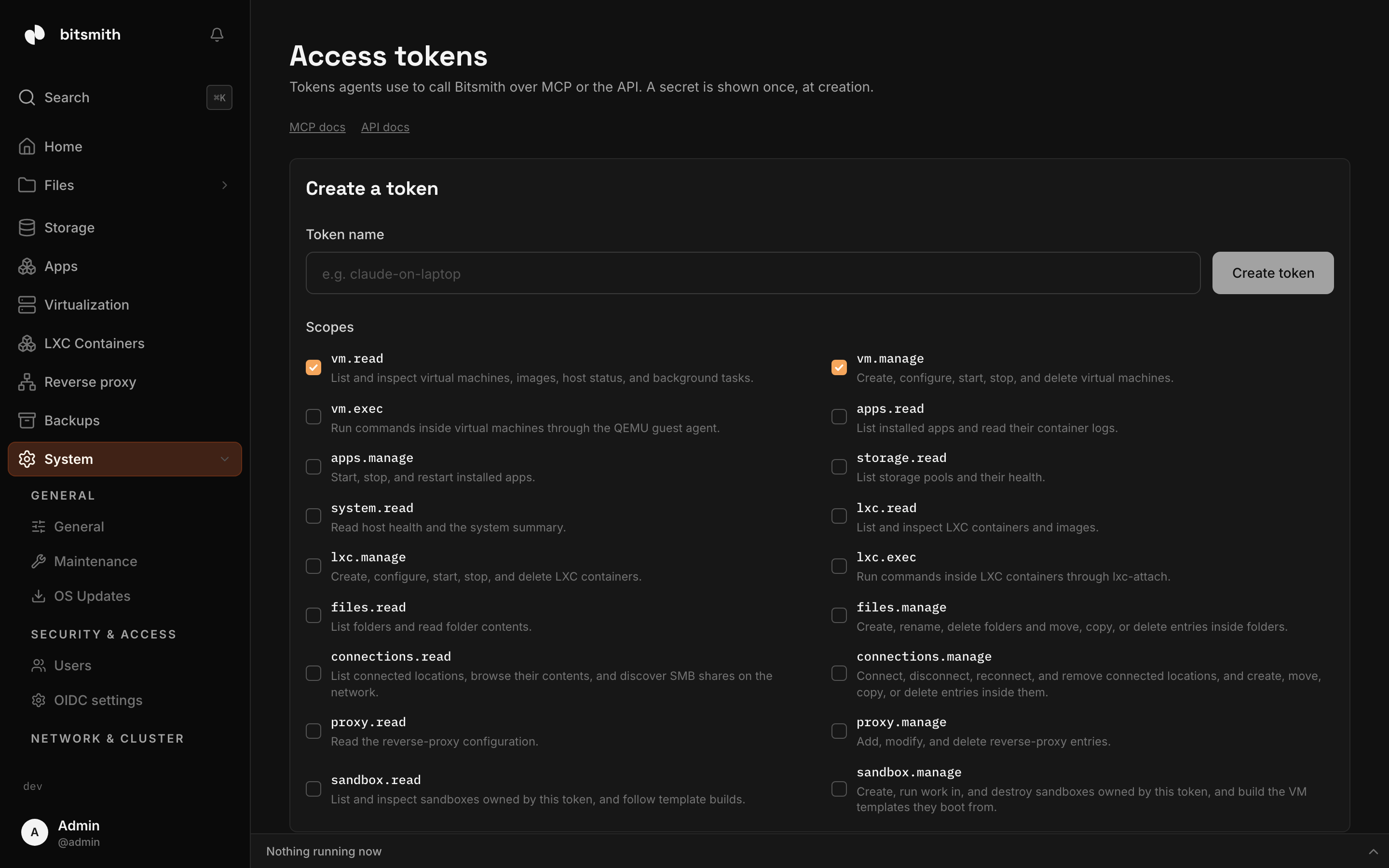
Connect an agent
Section titled “Connect an agent”- Open Access tokens (under System, Agent access).
- Give the token a name, for example “claude-on-laptop”, so you can recognize it later.
- Choose its scopes (see Scopes below for what each grants). Grant only what the agent needs.
- Create the token. Bitsmith shows a ready-to-paste client configuration once. Copy it now; the secret isn’t shown again.
- Paste the configuration into your MCP client. It points at your server’s
/mcpendpoint with the token in anAuthorizationheader.
From the CLI
Section titled “From the CLI”The bitsmith binary you use from your terminal is also an MCP server, so you
can hand an agent the tool surface without building the client configuration by
hand. Its bitsmith mcp command exposes the same tools as the box’s /mcp
endpoint, with the same names and schemas, so the grant you choose applies to
both transports.
Sign the CLI in first, on the machine where your agent runs:
bitsmith connectThat opens the box’s consent screen in your browser. You are already signed in
there, so you just choose the grant: Full, Read-only, or an exact set of
scopes. The agent token is stored on that machine when you finish. Add --url
to name a specific box, or --token to skip the browser if you already hold a
token.
Then register the agent. bitsmith setup installs the Bitsmith skill and
writes the MCP server into the agent’s config:
bitsmith setup claudeIt works for claude, codex, opencode, and kellix. By default the entry
spawns bitsmith mcp as a local stdio server, and every tool call is forwarded
to the box with the stored token. Add --remote to register the box’s /mcp
endpoint instead, the same target the manual token path above uses.
If your harness supports a headers helper, run bitsmith mcp headers to get the
Authorization header for it, so the token stays in the CLI’s store rather than
in the agent’s config.
Manage tokens
Section titled “Manage tokens”The Access tokens page lists every token with its scopes and when it was last used. Delete a token to cut off an agent immediately, without affecting your own sign-in or other tokens.
Approving what an agent changes
Section titled “Approving what an agent changes”A tool that changes something waits for you before it runs. Read-only tools (listing VMs, reading logs, checking health) answer at once, as before. Every other call shows up as an alert at once: in the bell, on the Alerts page, and through your notification destinations (email, webhook, Telegram) unless you switch An agent waits for approval off under What gets sent. Its Review button opens the call: the token, the tool, what it acts on, the time left, and its arguments.
- Approve runs the call once.
- Reject refuses it. The agent gets an error and nothing runs.
- Approve + auto-approve asks you to confirm, then runs the call and lets
this token run every tool that changes something —
run_command_on_hostincluded — without asking, on every server in a cluster. You pick for how long: one hour, one day, seven days, thirty days, or forever. The token’s auto-approval is shown on the Access tokens page, where you can change it or turn it off; deleting the token removes it with the token.
A notification never carries the call’s arguments, only the token, the tool and what it acts on, with a link that opens the Review dialog.
A call nobody answers is refused after 15 minutes, and so is a call whose agent stops waiting or one that’s waiting when Bitsmith restarts. Nothing runs unless a signed-in person approved it; an agent token can’t approve calls, its own or another’s.
On a cluster, a call is approved on the server the agent called, even when it
runs on another server through server_id. The alert comes from that server, and
the bell and Alerts page on every server show it; Review answers it on the
server where it waits. One approval covers the work on the other server.
What the agent sees. The call stays open until someone answers, so give the
agent’s tool calls a timeout longer than 15 minutes. Many MCP clients give up
after a minute by default; the call is then refused and you’ll see it leave the
list. A refusal is an error whose text starts with a code the agent can act on:
approval_rejected, approval_timed_out, approval_cancelled (the agent
stopped waiting), approval_interrupted (Bitsmith stopped),
approval_token_deleted, or approval_unavailable. Bitsmith’s MCP server tells
agents this when they connect.
From a terminal. bitsmith approvals list, bitsmith approvals approve <id> (add --auto-for 7d or --auto-forever to also auto-approve the token),
and bitsmith approvals deny <id> answer calls without a browser. They sign in with your Bitsmith account, not
the CLI’s stored agent token: they ask for your username and password (and a 2FA
code if your account has one), or take --user and --password-stdin in a
script.
Tokens from before auto-approval. When your server updates to the version where remembering became auto-approval, the per-tool remembered approvals are dropped: every token asks again until you auto-approve it. You can do that the next time a call waits (Approve + auto-approve), or any time from the Access tokens page.
A note on transport and security
Section titled “A note on transport and security”The generated configuration uses your server’s address over plain HTTP by
default, because MCP clients can’t click through the self-signed certificate a
browser can. On a home network that’s the same exposure as the rest of the
local interface. If you reach your server over Tailscale or a VPN, that traffic
is already encrypted; if you’ve set up a trusted certificate, use the https
URL instead.
Because a token can change real things on your server, prefer narrow scopes, name tokens so you know which agent holds which, and delete any you’re unsure about. The Activity log shows exactly what each agent did.
Scopes
Section titled “Scopes”An MCP token carries one or more scopes, and each scope grants a set of tools
the agent can call. Grant the narrowest set that covers what you want the agent
to do. Scope names follow a domain.level pattern, so new capabilities slot in
predictably.
| Scope | What it grants |
|---|---|
vm.read | List and inspect virtual machines, images, host status, and background tasks. |
vm.manage | Create, configure, start, stop, and delete virtual machines. |
vm.exec | Run commands inside virtual machines through the QEMU guest agent. |
docker.read | List Docker Compose apps and read their logs, stats, and docs. |
docker.manage | Install, start, stop, change, move, and uninstall Docker Compose apps. |
storage.read | List storage pools and their health. |
backups.read | List backup schedules, runs, versions and what a version holds, and read the backup settings. |
backups.manage | Create, change, run, and delete backup schedules, back up once, restore and delete versions, and change the backup settings. |
system.read | Read host health and the system summary. |
host.exec | Run shell commands on the host as the service user. |
lxc.read | List and inspect LXC containers and images. |
lxc.manage | Create, configure, start, stop, and delete LXC containers. |
lxc.exec | Run commands inside LXC containers through lxc-attach. |
files.read | List folders and read folder contents. |
files.manage | Create, rename, delete folders and move, copy, or delete entries inside folders. |
connections.read | List connected locations, browse their contents, and discover SMB shares on the network. |
connections.manage | Connect, disconnect, reconnect, and remove connected locations, and create, move, copy, or delete entries inside them. |
proxy.read | Read the reverse-proxy configuration. |
proxy.manage | Add, modify, and delete reverse-proxy entries. |
sandbox.read | List and inspect sandboxes owned by this token, and follow template builds. |
sandbox.manage | Create, run work in, and destroy sandboxes owned by this token, and build the VM templates they boot from. |
runners.read | List CI runner pools and their health. |
runners.manage | Create, update, and delete CI runner pools. |
Read scopes are safe to hand out freely; an agent with only read scopes can
look but not change. Manage and exec scopes let an agent change your server, so
grant them deliberately. The host.exec scope is the widest of all: it runs
shell commands on the box itself as the service user, so reserve it for agents
you trust on your own machine. The sandbox.* scopes go the other way: the
agent owns its own throwaway VMs on the server and can’t touch yours.
A token sees only the tools its scopes grant. Grant a narrow token and the agent loads a short tool list instead of the whole surface, which keeps its context small. This is a convenience, not the lock: the server also checks the scope on every call and refuses one the token lacks.
What the tools do
Section titled “What the tools do”- Virtual machines (
vm.read/vm.manage): list and get VMs, browse the catalog and on-disk images and ISOs, create a VM from an image, clone it, update its cloud-init or CPU and memory, start, stop, suspend, and resume it, delete it, wait for its IP or for it to be ready, and get its SSH connection details, move an image or ISO between storage pools, and check host readiness and the memory headroom left for new VMs. Data disks can be added, grown, and removed withadd_disk_to_virtual_machine,resize_disk_on_virtual_machine(grow only), andremove_disk_from_virtual_machine; the root disk is grown with the VM’s Increase storage action. - Warm states and template builds (
vm.manage; readable withvm.read):save_vm_warm_statefreezes a running VM’s memory and disk into a reusable state,create_vm_from_warm_statestarts a new VM from it, andlist_vm_warm_statesanddelete_vm_warm_statemanage them.capture_vm_as_templateturns a VM’s disk into a reusable image.build_templateandget_template_buildbuild a template from a base image and a cloud-init script, and are also callable withsandbox.manageandsandbox.read. - Run commands in a VM (
vm.exec):run_command_in_vmruns a shell command inside a guest through the QEMU guest agent. This works without a network path to the VM, which makes it useful for first-boot setup or rescue. For ongoing work, agents are pointed at SSH instead. - Host shell (
host.exec):run_command_on_hostruns a shell command on the box as the service user. This is the widest scope the box offers, so hand it out only to agents you trust on your own machine. - LXC containers (
lxc.read/lxc.manage): list and get containers, read their stats, create one from a cached or catalog template, clone it, start, stop, restart, freeze, and unfreeze it (control_lxc_containerwith anaction), rename it, change its resources, network, and GPU, set its disk limit, move its rootfs, delete it, and check the LXC host’s runtime status. Template tools:download_lxc_image,delete_lxc_image,move_lxc_image. Run commands in a container withrun_command_in_lxc_container(lxc.exec). - Apps catalog:
list_app_catalogneedslxc.readorvm.read.install_catalog_appneedslxc.managefor an app that installs as a container andvm.managefor one that installs as a virtual machine, like Home Assistant OS.update_catalog_appandretry_catalog_app_installwork the same way:lxc.managefor an app’s container,vm.managefor an app’s virtual machine. - Docker apps (
docker.read/docker.manage; tokens made with the olderapps.read/apps.managenames keep working): list apps, read an app’s logs and stats, list containers the server found that Bitsmith doesn’t manage, start, stop, or restart an app, install one from compose content and uninstall one, update its compose content and folder assignments, and move its data to another storage pool. - Files and folders (
files.read/files.manage): list folders and their contents, search them, and create, rename, move, copy, or delete folders and entries inside them. Every tool that takes a path also accepts atargetobject (src_target/dst_targetformove_entryandcopy_entry) of the form{"kind": "folder" | "connection", "id": "...", "path": "sub/path"}, so the same tool reads or writes a managed folder or a connected network share; the olderfolder_idandsub_patharguments keep working.copy_entrytakes one target of each kind, which is how data moves between a share and a folder. A connection target needsconnections.readorconnections.manageon top of the file scope. - Connected storage (
connections.read/connections.manage): list connected locations with their mount status and last observed reachability, get one, anddiscover_smb(hosts on the network withouthost, a host’s shares with it); connect a new share (credentials go to the secret store and are never returned), disconnect, reconnect, or remove a location. Browsing and changing files on a share goes through the file tools with a target of kindconnection; see Connected storage. - Reverse proxy (
proxy.read/proxy.manage): read the full config, certificate status, and available upstreams; add, update, and remove base domains and entries; enable or disable the proxy; set ACME settings, VIP, and DNS forwarding; toggle HTTP/3; renew certificates; and move the proxy between paired servers; see Reverse proxy. - Sandboxes (
sandbox.read/sandbox.manage): the token owns its own throwaway VMs instead of touching the operator’s: list and inspect its sandboxes, create one, suspend and resume it, and destroy it.wait_for_sandboxblocks until it is running or settled. - Runner pools (
runners.read/runners.manage):list_runner_poolsandget_runner_poolshow your CI runner pools and their observed health;upsert_runner_poolcreates a pool, or changes one when you pass itspool_id, anddelete_runner_poolremoves it. - Backups (
backups.read/backups.manage): list schedules, runs and versions (including the ones a server keeps for your other servers) and the files in a version; create, change, pause, run and delete schedules; back something up once withback_up_now; restore a version as a new VM, container, app or folder withrestore_backup_version, or put it back over the original withreplace_from_backup_version; delete versions; and read or change the backup settings. Sources and destinations are ids (a VM, container, app or folder; a storage pool,systemfor the system drive, a connected location, or a storage on another server), never raw paths. See Back up your data. - Your other servers (
system.read):list_serverslists the servers in your cluster, andget_cluster_statusshows each one’s address, whether it is online, its version, and which roles it holds, plus the cluster’s version and an Update all while one runs. Reads cover every server, each item naming its server;server_idnarrows a read to one server or runs a change on it instead of the server you called. - Storage, system, and tasks (
storage.read/system.read/vm.read): list storage pools and their health, read host CPU and memory health, summarize VM and LXC CPU and memory allocation against host capacity, search the activity log, and read the log lines a background task produced.
How actions are recorded
Section titled “How actions are recorded”Every action that changes something is written to the
Activity log under an “agent” category,
attributed to the token’s name, with the arguments it was called with. So is
every approval: the request, and who approved or rejected it, or that it timed
out. Read
calls aren’t logged, since agents poll often and the noise would bury the real
changes. This means you can always answer “what did my agent do” after the
fact, and an agent with system.read can answer it for itself.